How to Transfer Your Texas Real Estate License in TREC’s REALM Portal

Changing Brokers in Texas? Here’s the REALM Portal Transfer, Step by Step
If you are a licensed Texas sales agent changing brokerages, sponsorship is no longer handled the old paper-and-email way. TREC now processes license transfers through the REALM Portal.
The process is straightforward once you know where to click. This guide walks through how a Texas sales agent requests a sponsorship change, how to look up the new brokerage correctly, and what happens after you submit the request.
What “transferring your license” actually means in Texas
In Texas, a sales agent must be sponsored by a licensed broker to practice. When you move from one brokerage to another, you are not getting a new license number. You are asking TREC to change your sponsoring broker.
In the REALM Portal, that request is called Change or Request Sponsorship.
According to TREC, a sponsorship change is considered effective once it appears correctly in the REALM Portal — even if the public License Holder Search has not updated yet. After it is effective, you may:
- Update your Information About Brokerage Services (IABS) form
- List the new sponsoring broker on contracts
- Advertise under the new brokerage
Public search results can lag by a few hours, and sometimes longer. Use REALM as the source of truth.
Before you start
- Have your TREC REALM login ready. Create an account at www.trec.texas.gov if you have not already.
- Confirm your sales agent license is pinned to your REALM account and visible under Licenses / My Records.
- Know the exact business name and, if possible, the brokerage license number of the company you are joining.
- If your license record does not appear in REALM, contact TREC before starting an amendment.
Step-by-step: request a sponsorship change in REALM
1. Open the REALM Portal
Go to www.trec.texas.gov and click the REALM Portal button in the upper right corner. Log in.

2. Open your license record
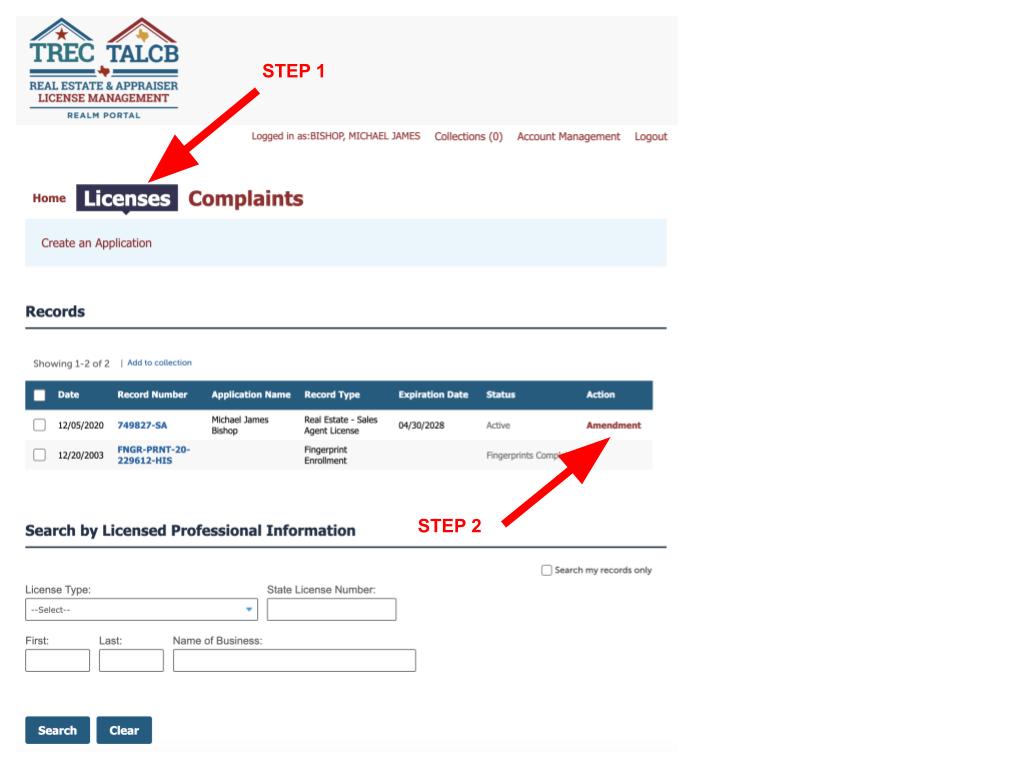
Click the Licenses tab (some accounts label this My Records). Find your active sales agent license. On the right side of that row, click Amendment.
3. Choose “Change or Request Sponsorship”
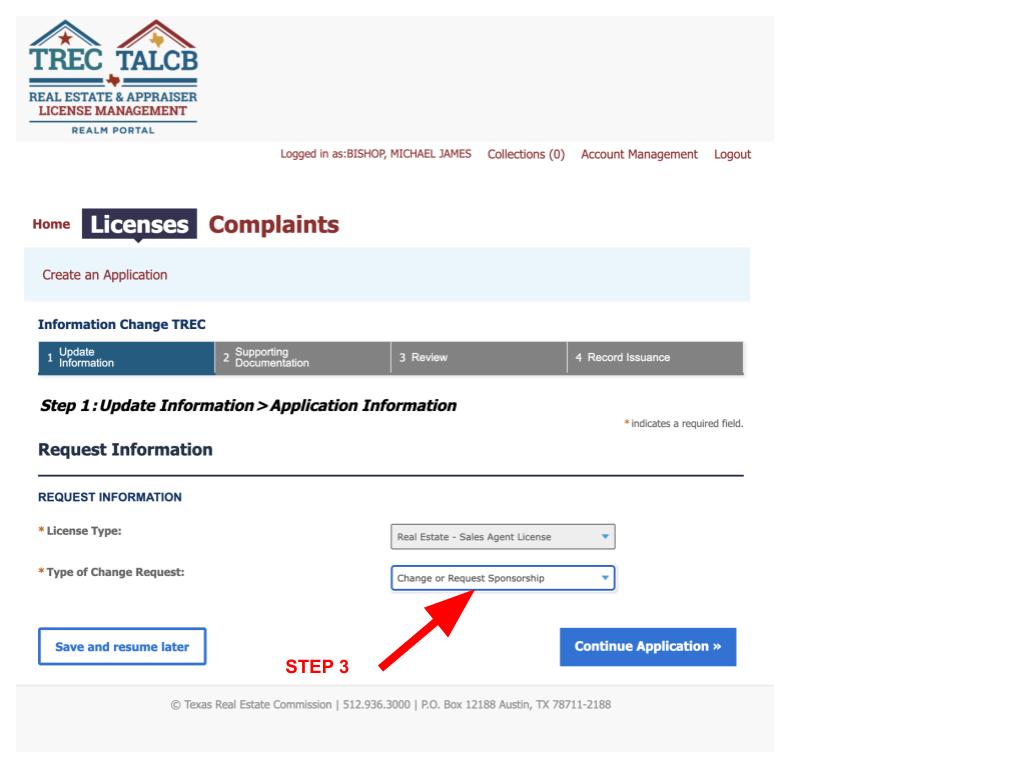
Keep the license type as your sales agent license. Under Type of Change Request, select Change or Request Sponsorship. Click Continue Application.
4. Look up the new brokerage
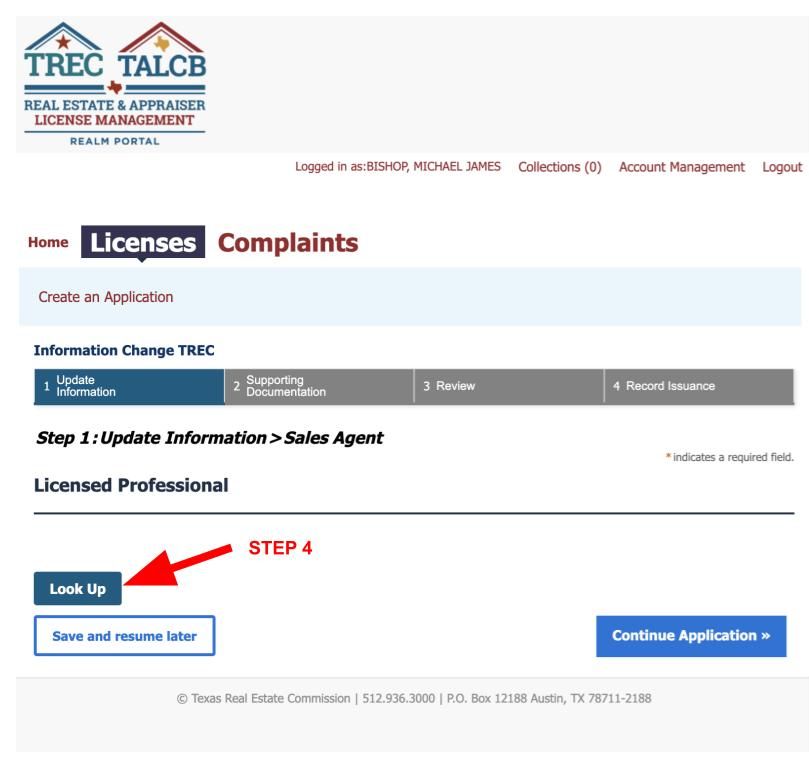
Click Look Up. A pop-up window will open.
This is the step that causes most delays. Search the wrong license type or an incomplete business name, and the wrong company can appear — or nothing will appear at all.
In the Look Up window:
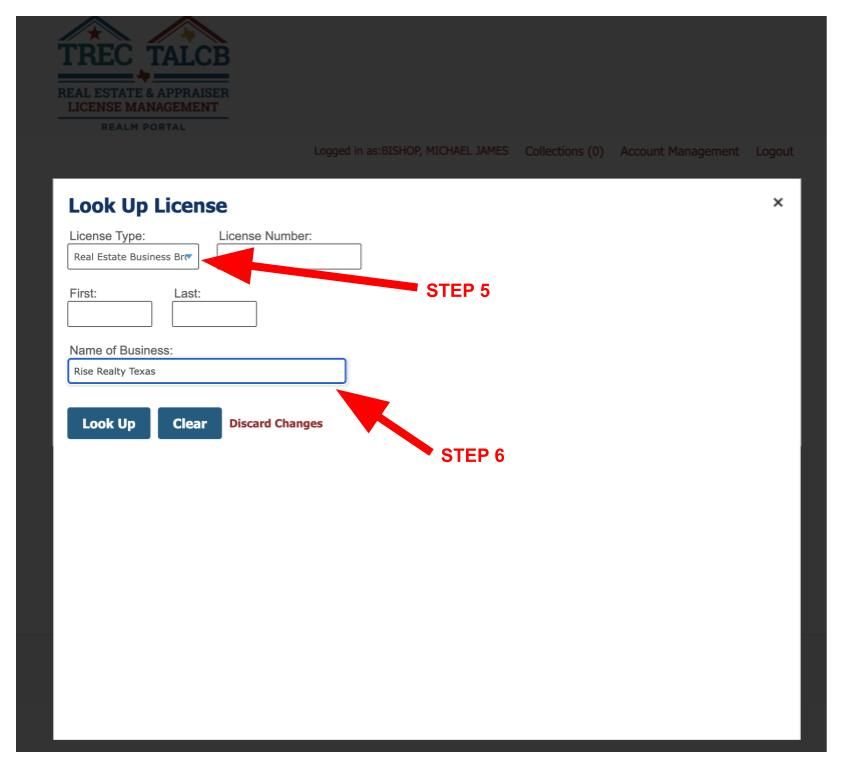
- Set License Type to Real Estate Business Brokerages.
- Enter the brokerage name in Name of Business.
- Click Look Up.
If you are transferring to Rise Realty Texas, type Rise Realty Texas in the Name of Business field. After the lookup, confirm the brokerage license number shown is 9016637-BB.
That extra check matters. Similar names exist in other markets. Matching both the business name and the Texas business-brokerage license number keeps the request from going to the wrong entity.
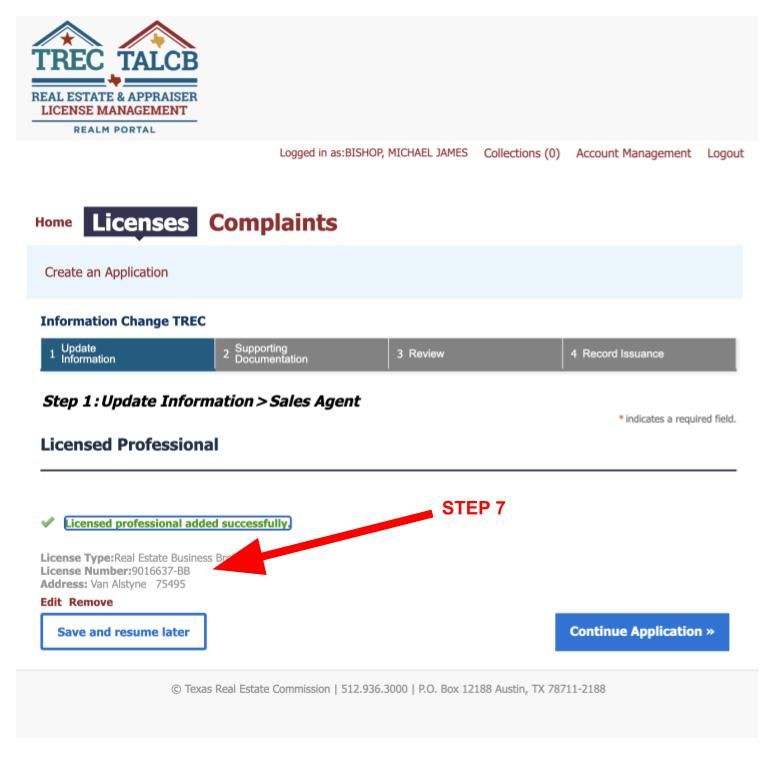
5. Confirm the brokerage details and continue
The pop-up should close after a successful lookup. You should see confirmation that the licensed professional was added, along with:
- License type: Real Estate Business Brokerage
- License number: 9016637-BB for Rise Realty Texas
- The brokerage address on file with TREC
If those details are correct, click Continue Application.
6. Review and submit
REALM will ask you to review and confirm the request. Submit it. The new broker then accepts the sponsorship on their side.
After acceptance, TREC emails a copy of the updated license certificate. Save that file. It is the cleanest record of the new sponsorship while public search results catch up.
What happens after you click submit
- You submit the Change or Request Sponsorship amendment.
- The brokerage reviews and accepts the request.
- REALM shows the new sponsorship on your license record.
- You receive an email with the updated certificate.
- The public License Holder Search updates later.
Once REALM shows the new broker, update advertising, IABS, email signatures, and contract brokerage information.
Common issues
- Wrong license type in Look Up. Search Real Estate Business Brokerages, not an individual broker name, unless you are joining a sole-proprietor broker.
- Close-but-not-quite business name. Use the legal name on file with TREC. For Rise Realty Texas, search “Rise Realty Texas,” then verify 9016637-BB.
- License not showing in REALM. Attach the license to your portal account first, or contact TREC.
- Public search still shows the old broker. If REALM is correct, the transfer is already effective.
Frequently asked questions
Do I need a new Texas real estate license to change brokerages?
No. Your license number stays the same. You are changing sponsorship through a REALM amendment.
Can I keep practicing while the transfer is pending?
You must be sponsored to practice. Until the new sponsorship is effective in REALM, follow TREC rules and your outgoing broker’s process. Do not advertise under the new company until REALM reflects the change.
How long does it take?
The agent side only takes a few minutes if the lookup is entered correctly. Timing after that depends on how quickly the new broker accepts. TREC says public search updates can take a few hours after REALM is correct.
What should I enter to join Rise Realty Texas?
In Look Up, choose Real Estate Business Brokerages, enter Rise Realty Texas, and confirm license number 9016637-BB before continuing.
Considering a move to Rise Realty Texas?
If you are using this guide because you are ready for a different brokerage model, look at how Rise Realty Texas is set up for agents. Review commission structure, support, and next steps here:
https://riserealtytexas.com/join
Have your REALM login ready, search Rise Realty Texas, confirm 9016637-BB, and submit the sponsorship request. After we accept it, save the new certificate TREC emails you and update your IABS and marketing to match.
This article is general information about using TREC’s REALM Portal to change sponsorship. Portal screens and TREC procedures can change. For official instructions, use the REALM Portal and TREC’s current guidance at trec.texas.gov.
Categories
Recent Posts